
A G-force meter that does not care which way the phone is pointing.
Lateral, braking and acceleration G, computed from the GPS trace rather than a tilted accelerometer or motion sensor, shown live as a friction circle and stored with every corner of every drive. The measurement needs no calibration step, ever.
Three axes, three sources
See how a drop in speed over time becomes a longitudinal deceleration and a recorded event. Read a harsh-braking event
No calibration, no orientation, no gravity leak.
An accelerometer measures acceleration along the phone's own axes. In a car the useful axes are the car's: forward, sideways, up. The two only line up if the phone is mounted level and square, and even then gravity leaks into the horizontal readings the moment the road tilts. Every G-meter app that reads the accelerometer directly has a calibration step for exactly this reason, and it drifts as soon as the mount moves.
Torq sidesteps the problem. GPS reports speed and course once a second. The rate at which the course changes, multiplied by the speed, is the centripetal acceleration of the car, in the car's own frame, regardless of where the phone is. The change in speed from one fix to the next is the longitudinal acceleration. Both are divided by 9.81 to give G.
- The cost is time resolution: a one-second sample cannot see a 200-millisecond jolt.
- Corner G is the 90th percentile through the corner, not the single highest sample.
- The gyroscope confirms a heading change is real yaw; the accelerometer handles the vertical axis.
The friction circle
The circle on the drive screen plots lateral load on the horizontal axis and braking or acceleration on the vertical. The dot is where the load sits now; the outer ring is roughly where road tires stop gripping. Trail-braking into a corner draws the dot from the top toward the side; a clean exit sweeps it from the side toward the bottom. It is the diagram data engineers use to read a driver, drawn from what a phone can see.
What is normal on the road
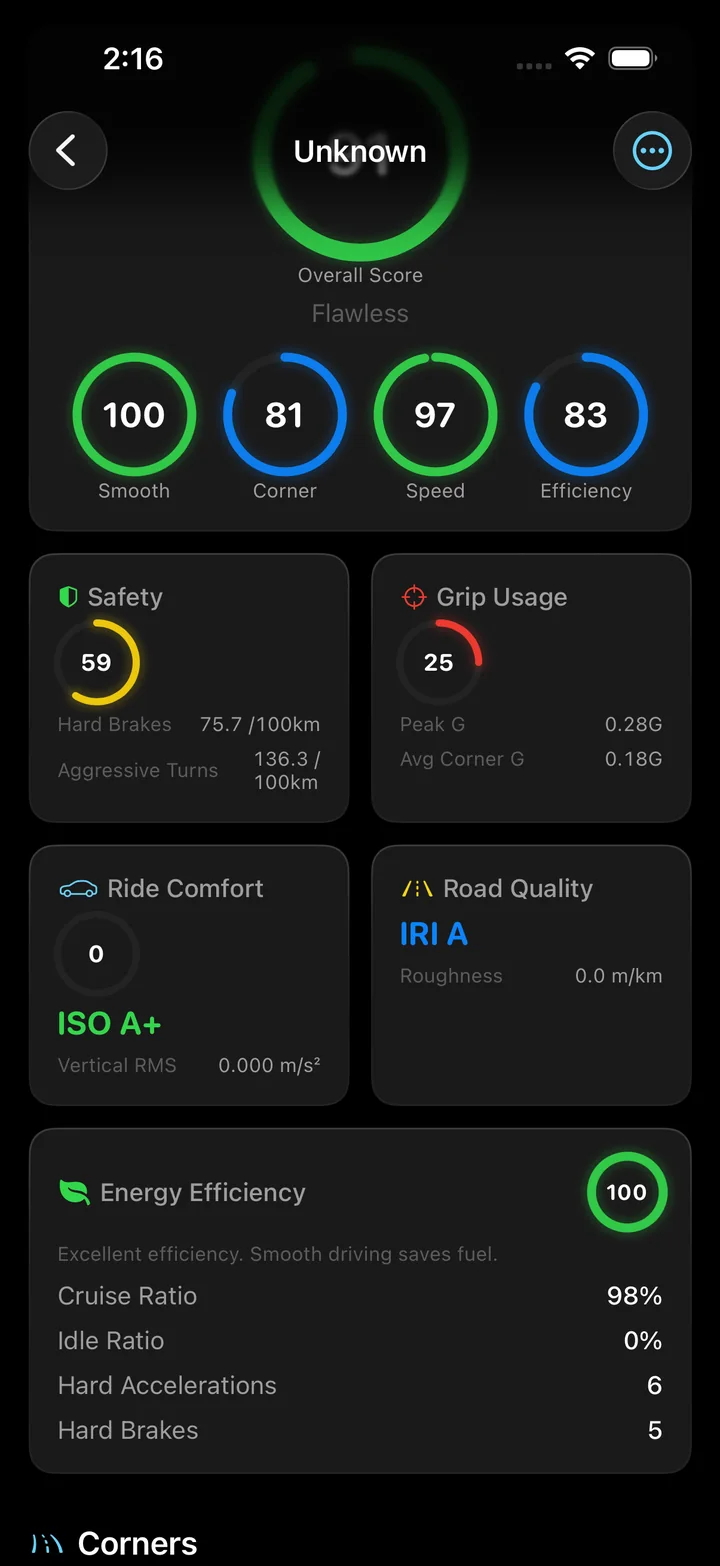
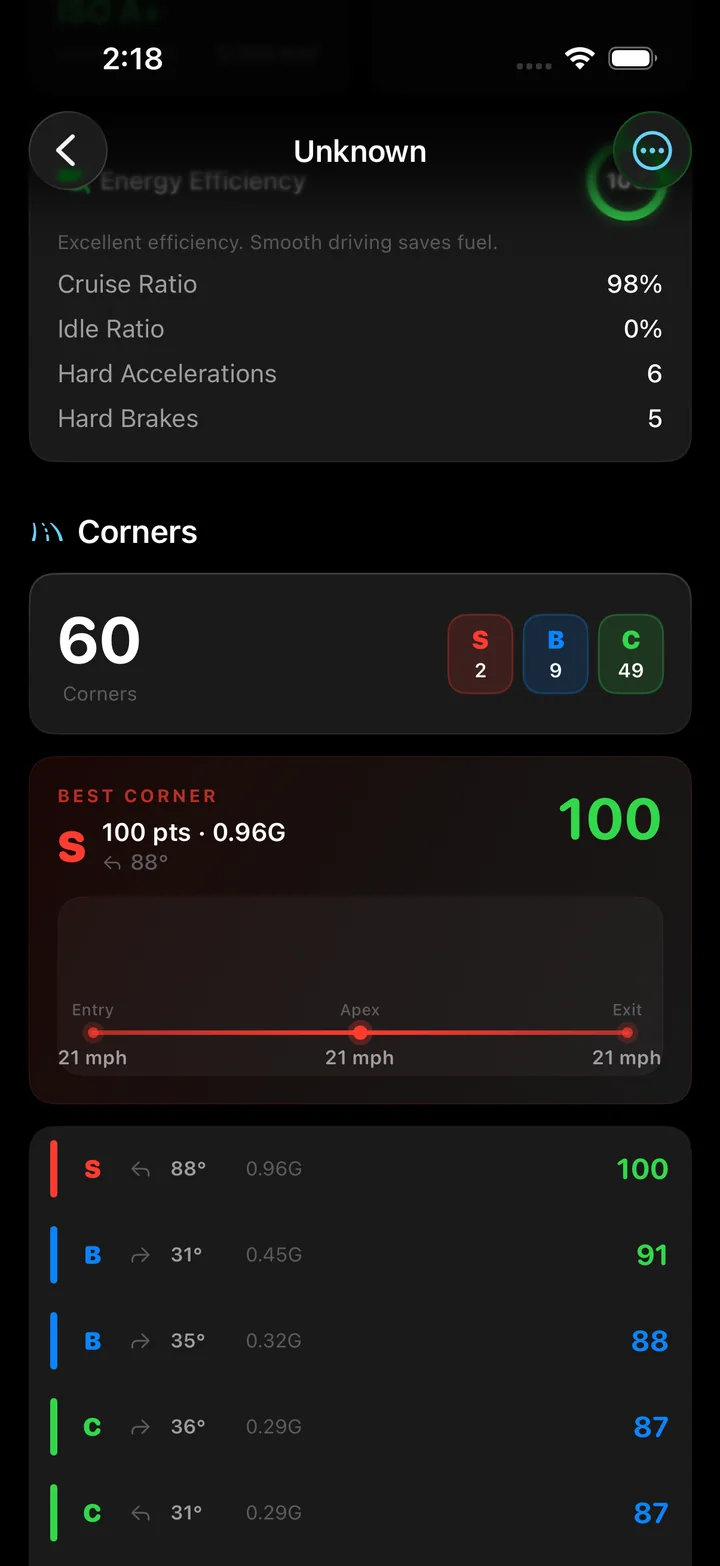
Ordinary driving stays under about 0.3 G in every direction. A brisk corner on a good road is 0.4 to 0.6 G, and a hard stop in traffic is around 0.5 G. Road tires on a dry surface give up somewhere near 0.8 to 1.0 G, which is why Torq caps the peak it will believe from a road drive at 3.0 G.
Where the numbers end up
Peak G, average corner G, max acceleration and max deceleration are in the vehicle dynamics section of every trip. Each corner carries its own lateral G alongside its entry, apex and exit speeds. The all-time peak G is one of the personal records in the Ranks tab, and the safety grade counts hard brakes and aggressive turns per 100 km.
Questions
How does a phone measure G-force in a car?
Two ways, and Torq uses both. Lateral G in a corner is computed from the GPS trace: speed multiplied by the rate the heading is changing gives centripetal acceleration, divided by 9.81 for G. Braking and acceleration G come from the change in GPS speed over time. The accelerometer and gyroscope handle the vertical axis and confirm that a heading change is a real turn.
Why not just read the accelerometer?
Because a phone in a mount is never perfectly level. A raw accelerometer reading mixes the car's motion with gravity leaking into the wrong axis and with every bump. Deriving the horizontal G from GPS speed and heading removes the orientation problem entirely.
What G-force is normal on the road?
Ordinary driving stays under about 0.3 G. A brisk corner is 0.4 to 0.6 G, a hard stop in traffic around 0.5 G. Road tires give up near 0.8 to 1.0 G on a dry surface.
What counts as a brake event or a hard acceleration?
A brake event is a deceleration of 3.5 m/s² or more, about 0.36 G, sustained rather than a single sample. A hard acceleration is 2.8 m/s² or more. Both thresholds come from telematics research on what drivers perceive as harsh.
Does the phone need to be mounted?
For lateral and longitudinal G, no: those come from GPS and work with the phone anywhere in the car. For the vertical axis, which feeds ride comfort and road quality, a mount matters, because a phone sliding around a seat measures the seat.
Is the peak G shown live?
The friction circle on the drive screen shows the current lateral and longitudinal load while recording. The peak G for the trip, the average corner G, and the G on each corner are computed when the drive ends and appear in the trip detail.
See the load, corner by corner.
Torq turns GPS speed and heading into lateral G, counts every hard stop, and keeps the peak for each drive.